How to Create Your Client Portal Account
and Complete Intake Form
|
|
Step 1: Access the Client Portal |
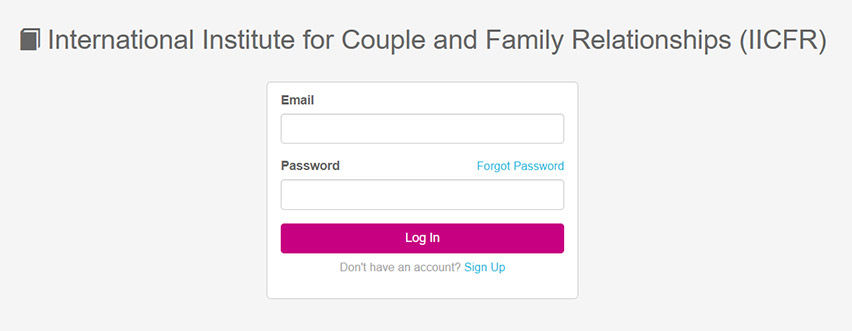
Please visit the client portal and log in using your email and password.
|
If you already have an account, simply click “Log In."
If you forgot your password, use the “Forgot Password” option.
If you are new, click “Sign Up” to create your account.
|
|
|
|
Step 2: Create Your Account (if applicable) |
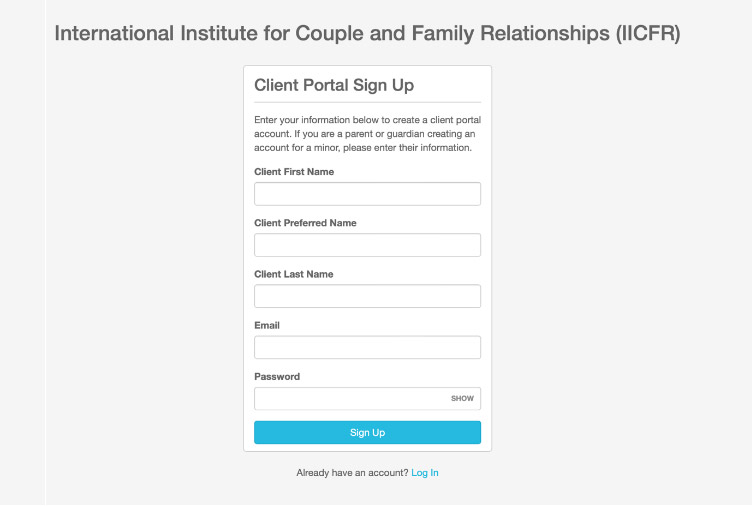
If you are signing up for the first time, please provide the following:
|
First Name
Preferred Name (optional)
Last Name
Email Address
Password
Once completed, click “Sign Up.”
|
|
|
|
Step 3: Complete Your Demographic Information and Save Your Information |
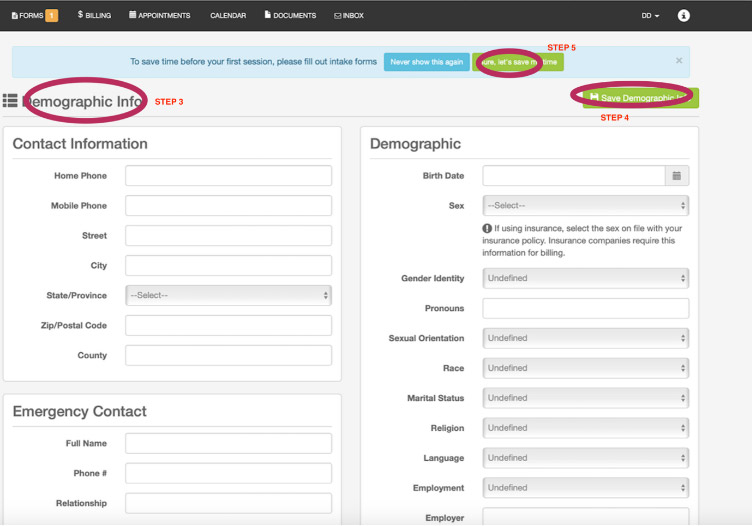
After logging in, you will be asked to provide the following details:
|
Contact Information
Phone numbers
Address
Emergency Contact
Name, phone number, and relationship
Personal & Demographic Information
Date of birth
Sex (for insurance purposes, if applicable)
Gender identity, pronouns
Additional background information (e.g., marital status, employment, etc.)
|
Some fields may appear as “Undefined” by default—please update them as needed.
|
|
After completing all required fields, click “Save Demographic Info.”
|
|
|
Step 4: Complete Intake Forms |
You will then be prompted to complete additional intake forms.
To make this process easier, please click “Sure, let’s save my time”
so your progress is automatically saved as you go.
|
|
|
Important Reminder |
|
Completing these forms prior to your first session allows your therapist to better understand your needs and helps maximize your time together.
If you have any questions or experience any difficulties accessing the portal, please feel free to contact us.
We look forward to working with you.
Warm regards, International Institute for Couple and Family Relationships (IICFR)
|
|
|
 |
|